Instagram Audio Downloader
Extract available audio from a supported public Reel or video and convert it to a compatible MP3 in your browser.
No login. We never store your files or your links.
- Free forever
- No login
- MP3 output
- 192 kbps conversion
How to download Instagram audio
-
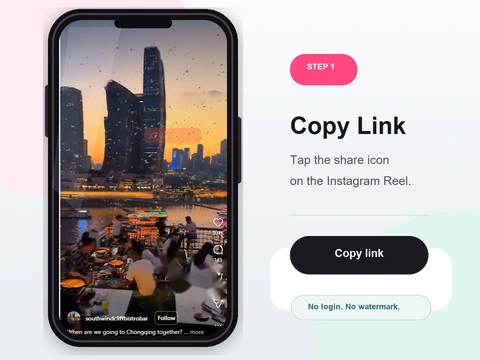 Step 1
Copy the Reel or post link
Copy the link of any public Reel or video that has the audio you want.
- Copy the link of the public Reel or video whose sound you want.
- Tap Share then Copy Link in the app, or copy the URL on the web.
- Reels with original or trending audio work best.
-
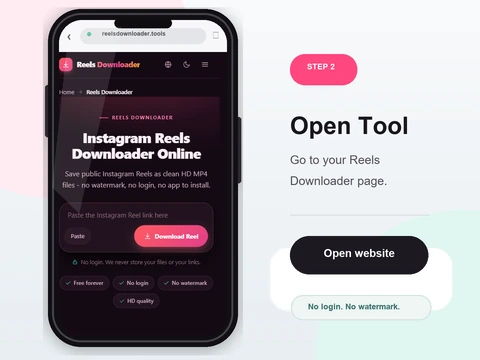 Step 2
Paste into Reels Downloader
Drop the link into the box above.
- Paste the link into the box above.
- Confirm the post is public - private content has no accessible audio.
- Reels Downloader checks for an audio or video source that is publicly available.
-
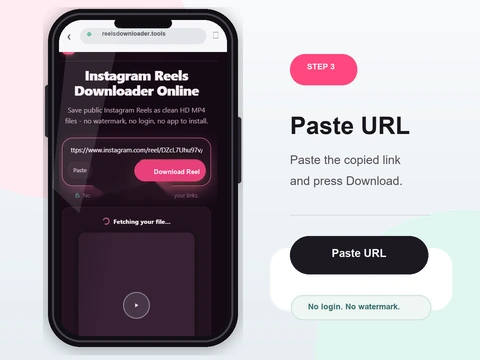 Step 3
Choose audio mode
Select MP3 audio extraction instead of full video.
- Tap the MP3 button to convert the sound to MP3.
- Conversion runs right in your browser (nothing is uploaded); the first run loads the converter once.
- Prefer the original? Use the smaller original link to grab the untouched AAC file.
-
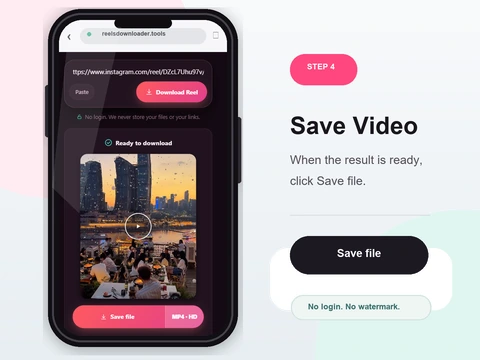 Step 4
Save the MP3
The extracted audio track downloads as an MP3 file.
- Save the MP3 - it plays in any music app or player.
- Files land in Downloads on desktop, or Files/Gallery on your phone.
- MP3 is a lossy compatibility conversion and cannot improve the source audio.
Clean MP3 extraction
MP3 output
The audio track is exported as a standard MP3 that plays anywhere.
Transparent conversion
MP3 conversion runs at 192 kbps in the browser and cannot restore missing source detail.
No login
No account or password required.
Fast & free
Free to use, subject to fair-use rate limits that protect service stability.
Supported audio sources
Public Reels
Extract the original or trending audio from any public Reel.
Public video posts
Any public feed video with audio works.
Original audio tracks
Creator original audio is preserved in the MP3.
Instagram audio, MP3 conversion and rights
The audio workflow uses an available public Reel or video source and can convert it to MP3 in the browser. Conversion improves compatibility, not upstream quality.
What this tool does not claim
- No studio-master recovery
- No guarantee that a muted track is available
- No private-content access
- No license to republish copyrighted music
Related evidence and troubleshooting
Audio and MP3 qualityReels video quality and audioWhere audio downloads are savedDownload troubleshootingWorks on iPhone, Android, and desktop
No app to install and nothing to sign up for. Reels Downloader runs entirely in your browser on every platform.
On iPhone
- 1Open Reels Downloader in Safari or Chrome
- 2Paste the copied link and tap Download
- 3Find the file in the Files app, then move to Photos
On Android
- 1Open Reels Downloader in Chrome
- 2Paste the link and tap Download
- 3The file saves to Downloads and appears in Gallery
On PC & Mac
- 1Open Reels Downloader in any browser
- 2Paste the link and click Download
- 3The file lands in your Downloads folder
Audio downloader FAQ
Can I save Instagram audio as MP3?
Yes. Reels Downloader extracts the audio track from public posts and Reels and saves it as MP3.
Does it work with Reels?
Yes. Audio extraction from public Reels is fully supported.
Is the audio quality preserved?
MP3 conversion cannot improve the source. Keep the available original file when quality matters.
Is login required?
No. No account or login is needed.
Can private content be extracted?
No. Only audio from public posts is accessible.
Does it work on phone and desktop?
Yes. It works in any browser on any device without installing an app.
Public content only
Reels Downloader works exclusively with public Instagram posts. We do not store your downloads, we do not save your links, and we are not affiliated with Instagram or Meta. You are responsible for respecting copyright and the platform rules for any content you download. Audio may be protected by copyright. Extracted audio is intended for personal use only - respect the rights of the original creators.