Instagram Reels Downloader Online
Save the best public MP4 source detected for an Instagram Reel - no added watermark, no login and no app to install.
No login. We never store your files or your links.
- Free forever
- No login
- No watermark
- Best detected source
How to download Instagram Reels
-
 Step 1
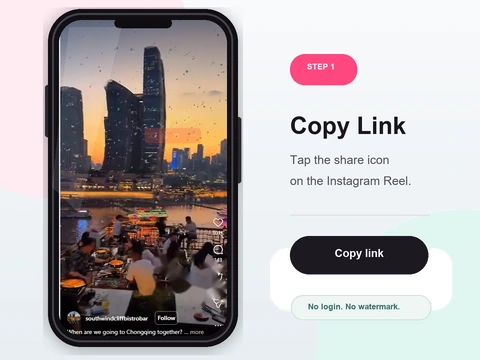
Copy the Reel URL
Open the Reel in the Instagram app or on the web, tap Share, then Copy Link.
- In the Instagram app, open the Reel and tap the paper-plane (Share) icon beneath it.
- Choose Copy Link - the full Reel URL is now on your clipboard.
- On the web, open the Reel and copy the address straight from your browser address bar.
-
 Step 2
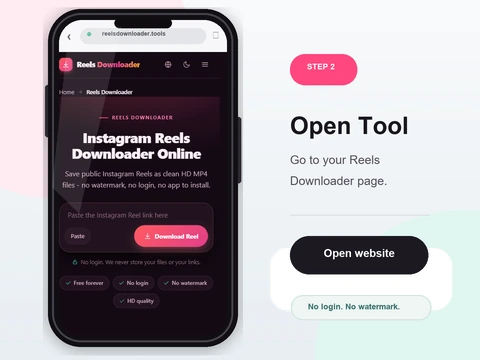
Paste the link
Drop the link into the box above and hit the Download button.
- Tap the box at the top of this page and use the Paste button, or long-press and choose Paste.
- Make sure it is a single Reel link, not your profile page or the Reels tab.
- Any format works - with or without tracking parameters, shortened or full.
-
 Step 3
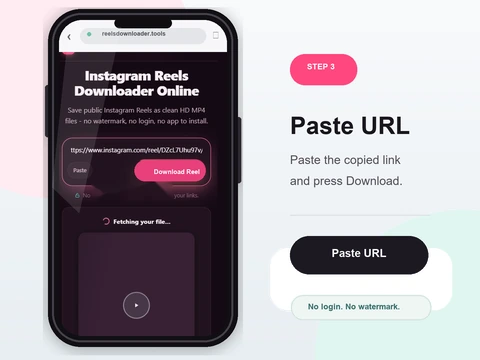
Click Download
Reels Downloader checks the public post and returns the media source it can currently detect.
- Press Download and wait for the public post to be checked.
- A preview and available file details appear when media is detected.
- If the source is unavailable, use the visible error category to troubleshoot.
-
 Step 4
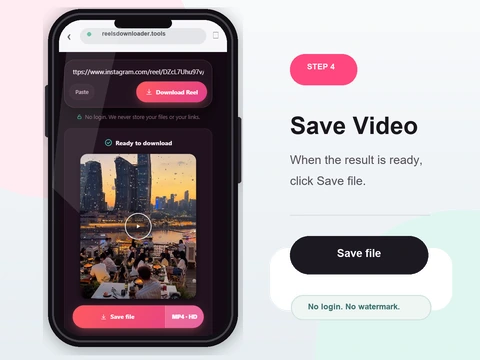
Save the MP4
The detected MP4 saves through your browser with no watermark added by this site.
- Click Save to download the detected MP4 without a new site watermark.
- On desktop it lands in your Downloads folder; on phones, in Files or your Gallery.
- Resolution and audio depend on the public source Instagram serves.
Why this Reels downloader
No watermark
This site does not add its own logo or watermark to the detected MP4 source.
No login required
We never ask for your Instagram credentials. Nothing to sign up for.
Source-aware quality
The downloader does not intentionally lower the detected source, but it cannot restore pre-upload quality.
Clear result states
The interface separates completed media, unavailable content, verification and service errors.
Reel download facts and quality boundaries
Use a public Reel URL to retrieve the detected MP4 source. The tool does not add a watermark, require an Instagram password or claim quality beyond the file Instagram serves.
What this tool does not claim
- Only currently public media
- No guaranteed 1080p or 4K
- No restoration of pre-upload quality
- Music rights are not granted by a download
Related evidence and troubleshooting
Reels quality, resolution and audioVideo quality and MP4 formatsPrivate Reel limitsiPhone Reel guideWorks on iPhone, Android, and desktop
No app to install and nothing to sign up for. Reels Downloader runs entirely in your browser on every platform.
On iPhone
- 1Open Reels Downloader in Safari or Chrome
- 2Paste the copied link and tap Download
- 3Find the file in the Files app, then move to Photos
On Android
- 1Open Reels Downloader in Chrome
- 2Paste the link and tap Download
- 3The file saves to Downloads and appears in Gallery
On PC & Mac
- 1Open Reels Downloader in any browser
- 2Paste the link and click Download
- 3The file lands in your Downloads folder
Reels downloader FAQ
How do I download Instagram Reels?
Copy the Reel link from Instagram, paste it into Reels Downloader, and click Download. The MP4 saves to your device.
Does this tool work without logging in?
Yes. No login or account is ever required to download a public Reel.
Can I download Reels without a watermark?
Yes. The downloaded MP4 file has no added watermark - it is the clean source file.
Does it only support public Reels?
Correct. Only content from public profiles is accessible. Private accounts stay private.
Why is my Reel not downloading?
Check that the account is public and that the link was copied directly from Instagram. Deleted Reels cannot be recovered.
Is the video quality preserved?
The tool returns the best public source it detects without an intentional video conversion. It cannot guarantee a fixed resolution or recover the creator master.
Public content only
Reels Downloader works exclusively with public Instagram posts. We do not store your downloads, we do not save your links, and we are not affiliated with Instagram or Meta. You are responsible for respecting copyright and the platform rules for any content you download.