Instagram Photo Downloader
Download the best public Instagram photo source detected - no added watermark and no login required.
No login. We never store your files or your links.
- Free forever
- No login
- Best detected source
- Carousels
How to save photos from Instagram
-
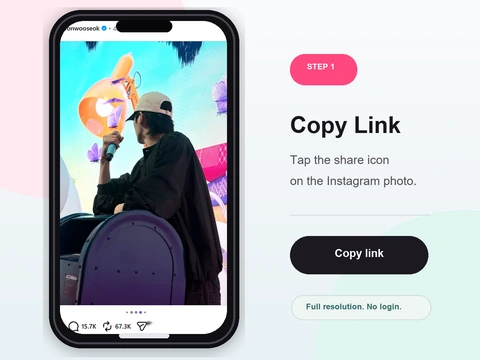 Step 1
Copy the post link
Tap the three dots on the photo post and choose Copy Link.
- Open the photo post and tap the three-dot menu, then Copy Link.
- On the web, copy the post URL from the address bar instead.
- One link covers a whole carousel - every image is retrieved.
-
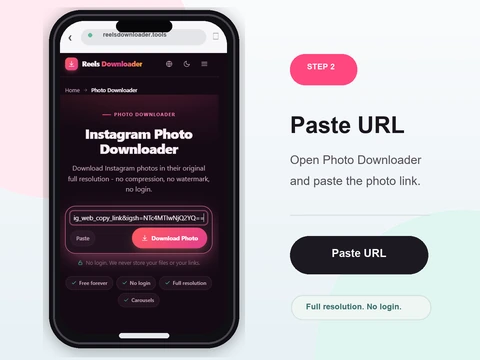 Step 2
Paste into Reels Downloader
Drop the link into the box above.
- Paste the link into the box above with the Paste button or a keyboard shortcut.
- Make sure it is a specific post link, not the profile page.
- Single photos and multi-image carousels are both supported.
-
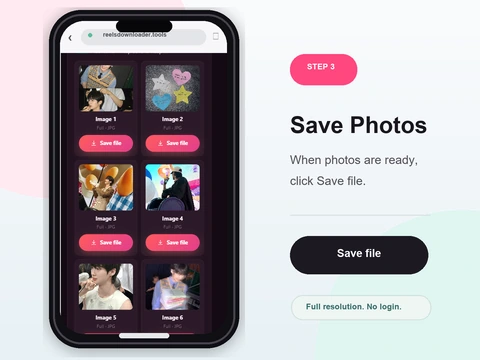 Step 3
Select and download
Pick a detected image from the post and save the browser-delivered file.
- Click Download to review each image source currently detected.
- Save carousel images individually and keep their item order.
- The result cannot exceed the quality Instagram makes publicly available.
Public photos with honest quality limits
Source-aware resolution
The tool returns the strongest public image source it detects, not a guaranteed camera original.
Carousel support
Every image in a multi-photo post can be downloaded separately.
No login
No account or password required.
Direct browser save
Detected image files save through the browser without an added site watermark.
Supported photo types
Single image posts
Standard photo posts from public accounts.
Multi-image carousels
Each image in the carousel is available to download.
Full-size preview
Preview each image at full size before saving.
Instagram photo, image and carousel facts
The photo downloader retrieves detected images from a public post and lists carousel items separately. It preserves the public source without claiming to reconstruct the camera original.
What this tool does not claim
- No removed-pixel recovery
- No private or deleted post access
- No guarantee every carousel slide is identical quality
- Screenshots are not source-file equivalents
Related evidence and troubleshooting
How to save Instagram photosPhoto quality and resolutionCarousel photos and videosWhere downloads are savedWorks on iPhone, Android, and desktop
No app to install and nothing to sign up for. Reels Downloader runs entirely in your browser on every platform.
On iPhone
- 1Open Reels Downloader in Safari or Chrome
- 2Paste the copied link and tap Download
- 3Find the file in the Files app, then move to Photos
On Android
- 1Open Reels Downloader in Chrome
- 2Paste the link and tap Download
- 3The file saves to Downloads and appears in Gallery
On PC & Mac
- 1Open Reels Downloader in any browser
- 2Paste the link and click Download
- 3The file lands in your Downloads folder
Photo downloader FAQ
Can I download Instagram photos in HD?
The tool returns the best public image source it detects. It cannot restore pixels Instagram already resized or compressed.
Does it keep the original file size?
Not necessarily. The public file can differ from the creator's original upload after Instagram processing.
Can I download multiple photos from one post?
Yes. Carousel posts are supported and each image can be downloaded individually.
Is login required?
No login or account is needed.
Can private photos be downloaded?
No. Only photos from public profiles are accessible.
Does it work on mobile?
Yes. It works in any mobile browser without installing an app.
Related download tools
Public content only
Reels Downloader works exclusively with public Instagram posts. We do not store your downloads, we do not save your links, and we are not affiliated with Instagram or Meta. You are responsible for respecting copyright and the platform rules for any content you download.